What Is a Multi-Stream Viewer?
A multi-stream viewer shows several live streams on one page. This guide explains how that differs from browser tabs, what it is good for, what it costs your device, and when a single stream is the better choice.
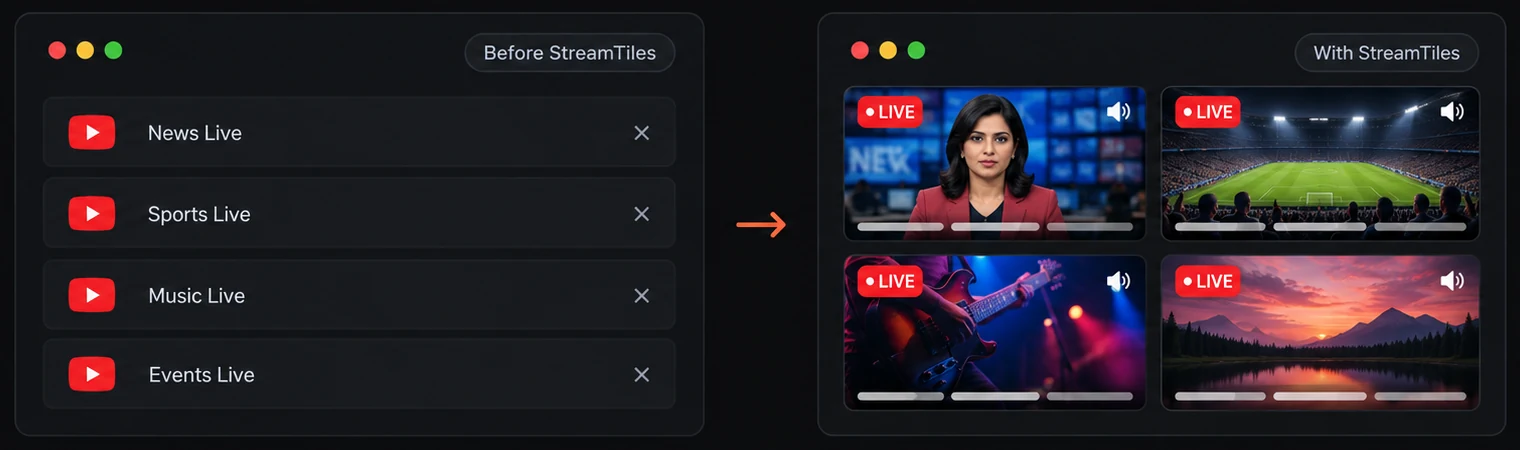
A multi-stream viewer is a web page or application that plays several live video streams at once, each in its own tile, so you can watch them together instead of switching between windows. It does not make the video; it arranges players that already exist. The point is to see several things happening at the same moment and to decide, stream by stream, which one you actually listen to.
This guide explains the idea in practical terms: how a viewer differs from simply opening more tabs, what people use one for, and the costs and limits that decide whether it is worth using. StreamTiles is used as the example because it is the viewer this site is about, but the principles apply to any tool of this kind.
The short definition
Three things make something a multi-stream viewer. It shows more than one stream at the same time. It puts them in a layout you can control, rather than leaving you to arrange windows by hand. And it gives you some way of managing sound, because several streams talking at once is unusable.
The video itself still comes from the platform that hosts it. In StreamTiles, a tile is the embedded player supplied by YouTube or Twitch, the same kind of player other websites use to show those videos. The viewer does not host, record or re-encode anything.
A shared grid compared with browser tabs
Tabs are the obvious alternative, and for two streams they are fine. The difference appears as the number grows.
| Question | Separate tabs or windows | A shared grid |
|---|---|---|
| Can you see every stream at once? | Only if you tile the windows by hand | Yes, they share one page |
| Who arranges the layout? | You, every time | The viewer, from a few layouts |
| What else is on screen? | The whole host page, including comments and recommendations | Just the players and their controls |
| Finding the one that is making noise | Click through the tabs | Each tile has its own mute control |
| Behaviour when hidden | Browsers may reduce activity in background tabs | All players are visible on the same page |
A grid does not make streams easier to follow in itself. It removes the clerical work of arranging and finding them, which is what makes tabs tiresome. Putting windows side by side is a legitimate way to get the same effect when you have only a few streams and a large monitor.
What StreamTiles supports today
StreamTiles accepts YouTube links and Twitch channel links, and you can mix both in one grid. YouTube links can be live streams or videos. Twitch links have to be live channels; Twitch videos and clips are not supported, and no other platform is. A workspace holds up to six streams, counting both platforms together. It runs in a web browser, so there is nothing to install, and it does not ask for an account.
There are three layouts. Grid gives every stream equal space, Focus enlarges one stream with the others alongside it, and Cinema keeps a wide main stream with the rest in a strip. The StreamTiles multi-stream viewer page describes the feature set, and the guide to watching Twitch and YouTube streams together goes through a mixed grid step by step.
What people use a multi-stream viewer for
- News. Following the same story on several channels, and noticing what each one chooses to show. See following live news from multiple channels.
- Gaming and esports. A match on one stream, a commentator on another, and a player's own view on a third.
- Live events. A conference or launch with an official broadcast and several unofficial ones.
- Study and work. A lecture beside reference material, or calm background streams. See the multi-screen study setup guide.
- Music and ambience. Several lo-fi or ambient streams, of which you pick one or mix two.
- Monitoring. Weather cameras, public feeds or several channels that you glance at rather than watch.
How many streams, and which layout
More tiles means smaller tiles. On a laptop, four streams in a grid is usually the most you can read comfortably, and six is for glancing. A good rule is to use as many streams as you will actually look at.
- Two streams: Grid, side by side. The easy case.
- Three or four: Grid for equal importance, or Focus when one stream matters more.
- Five or six: Cinema or Focus, with the main stream large and the rest as small monitors you check occasionally.
In Focus and Cinema the first stream in your list is the large one, so add your main stream first or drag it to the front.
Audio is the real constraint
Eyes can take in several things at once. Ears cannot. In practice you listen to one stream at a time, and the rest are visual. Browsers also generally block autoplay with sound, so StreamTiles starts every stream muted, and you unmute the one you want.
Each tile has its own mute button and volume slider. A Mute all button silences everything at once, and Audio focus in Settings mutes the other tiles whenever you unmute one. It is off by default, so you can still choose to run two at different volumes. The two platforms differ slightly: Twitch shows its own controls inside its player and they are not synchronised with StreamTiles' controls.
Desktop and mobile
A computer with a large screen suits a multi-stream view best, because tiles share the screen and stay readable. On a phone, the tiles stack in one column and the page scrolls, which keeps each video usable but means you see one or two at a time. Mobile browsers also limit autoplay and background playback. The desktop and mobile setup guide has the details.
What it costs your device and connection
Every tile is a live video that your device must download and decode. Six streams ask for much more network capacity, processor time and battery than one. There is no setting in a viewer that removes that cost, because the cost is the video. What you can control is the number of tiles, and whether tiles you are not watching keep playing. The guide to multi-stream bandwidth and data usage explains the factors without inventing figures.
Accessibility and usability
A busy screen is harder for everyone and especially hard for people who are sensitive to motion or who rely on captions. Some practical points: use fewer tiles than the maximum, mute tiles you only need to see, and keep the main stream large. Captions need a caveat: StreamTiles hides YouTube's own player controls, so caption and quality settings may not be available in a YouTube tile, and for a stream where you need captions it is better to open it on YouTube. Controls in StreamTiles are buttons and sliders, and a few keyboard shortcuts work on the focused stream: A to add a stream, Space to play or pause, M to mute and F for fullscreen. Dragging tiles needs a pointer, and Twitch tiles show Twitch's own controls inside the player, where StreamTiles' single-key shortcuts do not apply until focus returns to the tile.
Limits that apply to every viewer
- Embedding is decided by the owner. A stream whose owner has disabled embedding, or one that is private or removed, will not play in any viewer. The tile shows a message and the others keep playing.
- The streams are not synchronised. Two broadcasts of the same event can be a few seconds apart.
- Not a replacement for the platform. Chat, subscriptions and the host's own features stay on the host's site.
- Third-party content. The streams belong to their publishers and can change or disappear. StreamTiles is independent and is not affiliated with YouTube, Twitch or the channels shown.
When a single stream is the better choice
A viewer is not always the right tool. If you are following one stream closely, a single large player is easier on your attention and your device. The same is true when you need to rewind or seek often, since tiles in StreamTiles do not have a seek bar. If you catch yourself watching one tile and ignoring the others, close the others.
Frequently asked questions
Is a multi-stream viewer the same as a video wall?
They are related. A video wall usually means a dedicated display set up to show many feeds, often in a control room. A multi-stream viewer does the same job in a browser page on an ordinary screen.
Do I need to install anything?
Not for StreamTiles. It runs in a web browser and does not ask for an account.
Does it download or record the streams?
No. Each tile is the platform's own embedded player. StreamTiles does not host, record or re-encode the video.
How many streams can I watch at once?
StreamTiles holds up to six, counting YouTube and Twitch together. A smaller number is usually easier to follow and lighter on your device.
Conclusion
A multi-stream viewer is a layout and audio tool for following more than one live stream. It beats tabs when you need several streams visible together, and it costs your device more than a single stream does. Use as many tiles as you will actually watch, keep one source of sound, and expect some streams not to play because their owners do not allow embedding. To try one, start with the StreamTiles homepage, or read how to watch multiple YouTube live streams at once for a step-by-step walkthrough. If you are weighing viewers against each other, see how StreamTiles compares with Streamer.Guide Multiwatch on documented features.